New York, NY /

Hi, I'm Usmaan, a Product Designer based in Queens, NY. I design digital products that feel effortless to use, pairing sharp visual craft with a deep interest in how people actually interact with software. I work across mobile and web, from early research through prototyping and hand-off. I also run On The Run Studio, where I collaborate with clients on websites and brand-forward web experiences.

Rented

Case Study

Designing peer-to-peer rental experience for urban renters.

Overview

Most people own tools and gear they use once, then store forever. Rented lets neighbors lend and borrow instead — without the friction of classifieds or the overhead of a rental shop. I was sole designer across the full mobile experience: onboarding, browse, product pages, and profiles.

Problem

The P2P rental market has two failure modes. Apps like Hygglo front-load heavy verification and lose users before they ever browse. Apps like Craigslist skip trust entirely and feel unsafe at stranger-to-stranger scale. Neither handles the person who wants to rent their drill out on Tuesday and borrow a camera on Saturday — same person, two roles, no platform built for both. Those three gaps shaped every design decision in Rented.

High Role Flexibility Low Role Flexibility High Trust Low Trust Rented's Target H FB CL OU YZ Hygglo FB Marketplace Craigslist OfferUp Yoodlize
1

Onboarding Friction

Most platforms front-load heavy verification or skip it entirely. None balance fast onboarding with trustworthiness.

2

Two-Sided Role Support

No platform handles the renter-to-lister duality well. You're either buying or selling, never both seamlessly.

3

Cross-Category Browsing

Every app struggles to make browsing feel clear across wildly diverse item types — tools, cameras, camping gear, party supplies.

Competitive Analysis

Core Flow

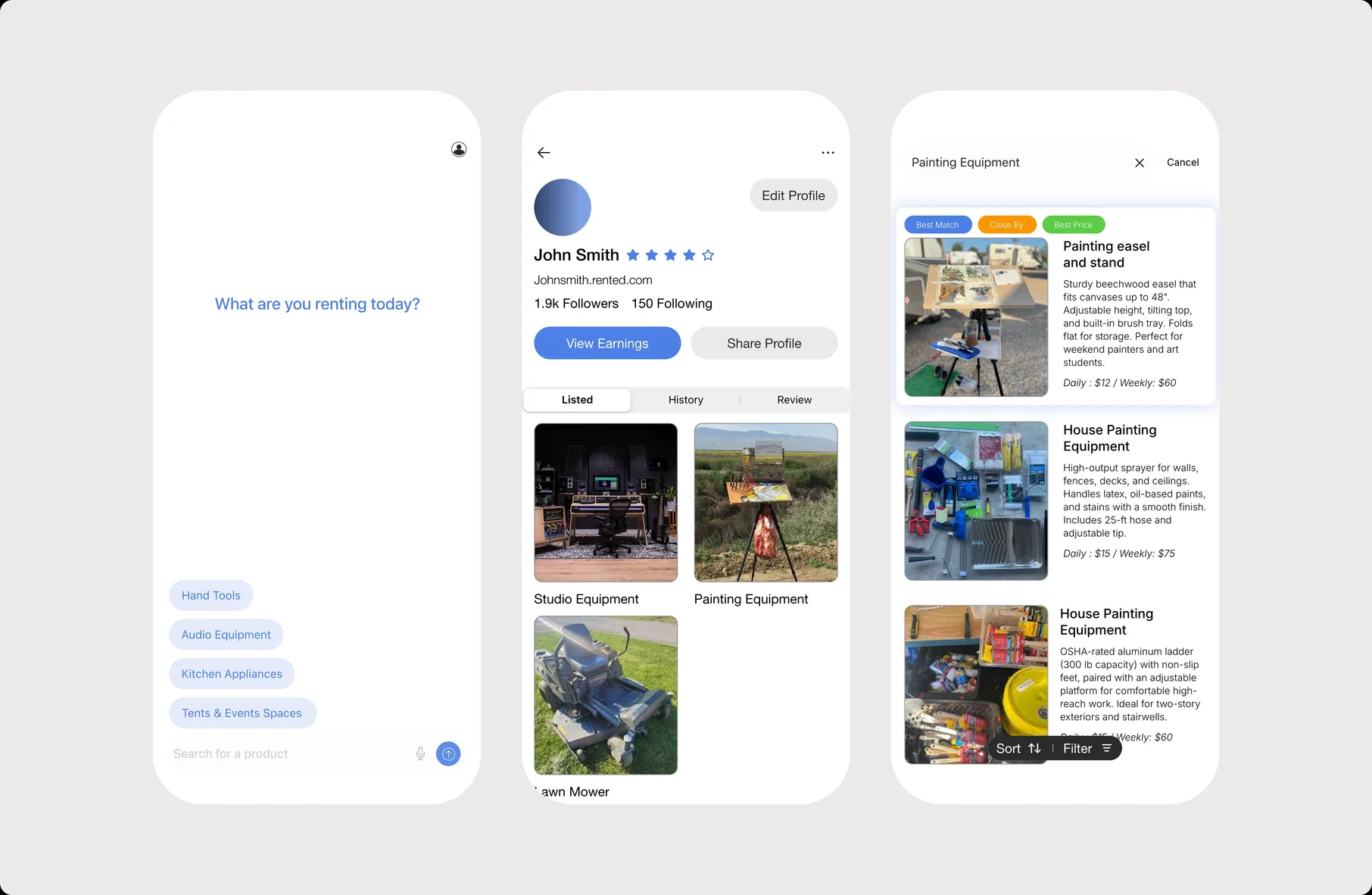
Onboarding The first wireframe pass was conventional — email, password, confirm, submit. It asked for commitment before showing any value, which competitive analysis had already flagged as the main drop-off point for Hygglo. The delivered version leads with the product's value proposition, puts SSO front-and-center (Apple, Google, Facebook), and follows auth with a single category prompt — "What are you renting today?" — that gets a new user browse-ready in under a minute without a verification wall.

Browse The hardest problem was making explore legible across inventory that has nothing in common. A drill and a party tent belong in the same catalog but require completely different browse contexts. A search-first model assumes you know what you're looking for — that fails for the "I need something for a weekend project" use case. The delivered explore surface uses category-led browsing as the primary entry point, with search available but not mandatory. The main unresolved ask at handoff was filter and sort for mixed inventory. Multi-category browse is not a single-category shop, and I hadn't fully cracked it.

Profiles & Listing The profile had to hold two identities at once — renter and lister — without forcing a mode switch. The delivered structure uses a tabbed layout (Listed · Currently Renting · History · Reviews) that treats both roles as equal rather than defaulting to one. The PDP leads with imagery, surfaces the lister's profile and rating immediately below — trust at the point of decision, not buried — and keeps listing metadata scannable rather than buried in a long-form description field.

Rented wireframe screens showing conventional auth flow, basic search, and simple profile layout
Rented early mockups with Google SSO, category prompt, and tabbed profile taking shape
Rented delivered designs with SSO onboarding, category-led browse, and dual-role profiles

Conventional auth flow, basic search, simple profile — identifying what needed to change.

Google SSO, category prompt, profile tabs taking shape — testing structural decisions.

SSO + value-first onboarding, category-led browse, dual-role profiles — final design system applied.

Outcome

Handoff included a design system, annotated core flows, and an interactive prototype the team could run on their own phones. We aligned on onboarding, profiles, and PDPs. The outstanding ask was a simpler explore with filter and sort for mixed inventory — the surface most likely to drive retention, and the one that needed more cycles. Build paused when engineering reprioritized. The work sharpened how I think about products where the same person plays two roles, catalogs that resist easy categorization, and what it means to design for a small team's real delivery constraints.

What I'd do with more time: usability-test browse and onboarding with real users before handoff, not after. Push explore further — filters, sorts, layout variants for different category densities. Bring the lister path to the same polish as the renter path. Add trust infrastructure — ratings, verification, transaction history — that holds up when a stranger is renting your camera to another stranger.

National Muslim Youth Association

Case Study
View Website

Redesigning a non-profit website to better serve the Muslim youth community.

National Muslim Youth Association website display

Overview

The National Muslim Youth Association is a non-profit whose website hosts religious teachings, event materials, and program resources visited by youth members nationally. I was brought on to maintain the site, but after assessing its state — cluttered navigation, outdated content, and active malware — I proposed and led a full redesign.

Problem

Years of content updates without structural cleanup left the site hard to navigate. Parents couldn't find teaching materials. Youth skipped the site entirely. The WordPress build had malware issues that made maintenance risky. The site needed to be rebuilt from the ground up — new platform, new IA, new design system.

Old vs New NMYA Website
Old NAA UI vs. New Design

Wireframe & Development

I began working on wireframes for the new website, researching and solving the major pain points users were facing. Once the board approved the final wireframes, I developed the site on Webflow — incorporating the organization's logo colors and assets, introducing additional colors for the interface, and prioritizing accessibility across screen sizes, particularly mobile devices and tablets.

User Research

While developing the new website, I conducted user research groups. I collaborated with small focus groups, providing them with an early prototype. This helped me understand how users navigated and interacted with the site, and compare their behavior against the old website.

User Research Chart
User Research Results

Outcome

The final version launched in June 2024. After a few months, traffic increased by ~30% as users became familiar with the site. Youth visitors rose due to the interactive sections on various pages. Parents and teachers found it much easier to navigate. I continue to manage, enhance, and maintain the website.

+35% +25% +15% 0% Jan Mar May Jul Sep Nov Dec Engagement growth post-launch (2024)

On The Run Studio

Case Study
View Website

Creating a brand and a Design Studio.

On The Run Studio website display

Overview

On The Run Studio is a design studio that began as a personal project to curate and share images that inspired me and my work. Over time, the page grew and built a community of like-minded individuals who found inspiration in the posts. Along the way, I designed and produced products and merchandise inspired by these influences. On The Run Studio continues to share, inspire, and grow the community while connecting with brands and companies to assist in web design and development.

On The Run Studio Mobile UI

Merchandise

For 2 and a half years, I designed and produced merchandise inspired by my upbringing and the images I had curated. I started off with a t-shirt and a mug. For the t-shirt, I created a design that was simple and clean — the graphic was inspired by the Unisphere in Flushing, NY. For the mug, I placed the early On The Run Studio logo on the front.

Web Development

The On The Run Studio website was hosted on Shopify initially for the first year and a half. The following year, I redesigned and hosted the website on Squarespace. After another year and a half, I moved to Framer for a few months. Currently, the website is hosted on my own domain and is built with HTML, CSS, and JavaScript.

Design Studio

On The Run Studio is continuing as a design agency to assist brands and companies to strategically design and develop their websites. The agency provides a full-service design and development solution, from initial design to launch and ongoing maintenance.

Adsum NYC

Case Study
View Website

Web Design & Marketing for a Brooklyn-based brand.

Overview

Adsum is a Brooklyn, NY-based brand. I design landing pages for new collections, sales, and events on an ongoing timeline. Additionally, I assist with launching new campaigns and assist with outreach. I work closely with the brand's founder.

Landing Pages

I designed landing pages for the brand's new collections and releases, as well as for the holiday sale announcements. Each page is crafted to match the brand's visual identity while driving conversion.

Size Filter Feature
Size Filter Feature

Size Filter

I designed and developed a size filter feature for the collection pages, enabling customers to filter products by their sizes and see what is available. This reduced friction in the shopping experience and helped customers quickly find items in their size.

Additional Work

Beyond web design, I have created graphic designs for the brand's email announcements — including Black Friday and Cyber Monday campaigns — and assist with ongoing marketing outreach and social media content.

Campaigns & IG Posts